
Archive: Original Research Archive: April 18, 2024 (Post-ACP Lifeline Transition Cycle) | Last Comprehensive Audit: November 2026 | Written by Claire Holloway, MPA and Reviewed by Marcus Bennett, JD
A free tablet with Medicaid is possible through Lifeline, not through Medicaid itself. Medicaid enrollment qualifies a household for the federal Lifeline discount, and some carriers then offer a tablet with a co-pay or a low cost upgrade. Check the National Verifier first, and confirm Wi-Fi or cellular costs.
A Free Tablet with Medicaid Starts with Lifeline, Not Medicaid Itself
Medicaid does not send tablets to members. That fact surprises many people, because the connection between the two programs is real but indirect. Medicaid enrollment is one of the accepted ways to qualify for Lifeline, the federal program that lowers the cost of phone or internet service. Once Lifeline is approved, a carrier that participates in Lifeline may offer a tablet as part of its own promotion. The tablet is a carrier offer, and the rules, the price, and the stock all come from that carrier.
Lifeline is run by the Federal Communications Commission and administered by USAC, the Universal Service Administrative Company. The discount is up to $9.25 per month for most households, and up to $34.25 per month on qualifying Tribal lands. Lifeline pays toward service, and it does not require a carrier to give any customer a free tablet. Some carriers do offer tablets to Lifeline customers, sometimes free and sometimes for a one time co-pay, because a tablet helps a customer use the service. Other carriers offer only a phone, or only a discount on service.
The one per household rule is strict, and it matters before a family applies twice. Only one Lifeline benefit is allowed per household, even if two people in the same home each receive Medicaid. A household is a group of people who live together and share income and expenses, not simply people at the same address. If a spouse, a parent, or an adult child already uses Lifeline at that address, a second application will be stopped. Check who in the home already has the benefit before anyone starts a new application.
Medicaid Card Verification: What Carriers Actually Check
Carriers do not decide Medicaid eligibility themselves. They send the application to the USAC National Verifier, which checks the information against program records and other sources. The verifier looks for a match on the applicant name, date of birth, address, and the last four digits of a Social Security number in most cases. It does not ask this website for a Social Security number, an EBT PIN, or a full date of birth, and readers should never enter those details on a directory site. The official check happens through the National Verifier or through a carrier that connects to it.
A Medicaid card can help prove enrollment, but a card alone is not always enough. Some states issue cards that do not show a current enrollment date, and some people receive Medicaid through a managed care plan with a plan card instead of a state card. A carrier may ask for a Medicaid approval letter, a benefits letter, or a screenshot from a state benefits portal that shows the name, the program, and a recent date. Keep a letter or a portal printout ready, and make sure the name on it matches the name on the Lifeline application exactly, including spelling and any suffix.
If the National Verifier cannot find a match, do not assume the application is finished. A mismatch often comes from a recent move, a name change after marriage, or a Medicaid renewal that has not yet been recorded. The verifier usually explains what document can fix the problem, and the applicant can upload proof through the official Lifeline site. Take a clear photo of the document, check that every corner is visible, and keep the original letter until the approval arrives. A second try with clean proof often succeeds where a first try with a blurry card fails.
The $9.25 Monthly Discount and What It Does Not Buy
The Lifeline discount lowers a monthly bill, and that is all it is designed to do. A household that qualifies receives up to $9.25 off the cost of phone or internet service each month. On qualifying Tribal lands, the discount rises to up to $34.25 per month. The discount does not pay for a tablet, it does not pay for accessories, and it does not cover a second line. Anyone who hears that Lifeline guarantees a tablet is hearing a sales claim, not a program rule. The tablet, when one is offered, is a separate carrier decision.
Some carriers use the discount toward a plan that includes a tablet, and the monthly price after the discount can still be more than zero. A plan might cost $25 per month before Lifeline and $15.75 after the discount, or it might cost $9.25 and drop to zero for basic service. The difference depends on the carrier, the plan, and whether the tablet is tied to a cellular line. Ask for the price after the discount, the price after any promotion ends, and the price of the tablet line itself. Write those three numbers down before signing, because a promotion price and a regular price are often very different.
Households that qualify by income instead of by Medicaid use the 135 percent Federal Poverty Guidelines ceiling. For 2026, in the 48 states and the District of Columbia, that ceiling is $21,546 per year for one person, $29,214 for two people, $36,882 for three people, and $44,550 for four people. Larger households add $7,668 per additional person. Medicaid enrollment is usually the simpler path for people who already have it, because no income math is needed. People who do not have Medicaid can still qualify by income, but they will need pay stubs, a tax return, or another proof of income.
Managed Care Plans and Extra Device Perks Worth Asking About
Many Medicaid members receive care through a managed care plan, which is a private health plan that works with the state. These plans sometimes offer extra benefits that go beyond doctor visits, and a tablet or a phone can be one of them in some states and some plans. The extras change by state, by plan, and by year, so a perk that a neighbor received last year may not exist in a different plan this year.
A plan may offer a tablet for telehealth visits, a phone for appointment reminders, or a data allowance for virtual care. It may also offer nothing at all, and that answer is useful too, because it stops a family from waiting on a benefit that does not exist. If a plan does offer a device, ask who ships it, how long delivery takes, whether the member pays anything, and whether the device must be returned if the member changes plans. Get the answer in writing if possible, either in a letter, an email, or a note with the date and the name of the representative who answered.
Managed care perks do not replace Lifeline, and they do not conflict with it. A household can use a plan benefit and a Lifeline benefit at the same time, as long as each program rules are followed. The Lifeline one per household rule still applies, and the managed care plan does not count as a Lifeline provider. Keep the two programs separate in paperwork and in expectations. Lifeline is for monthly service, a managed care perk is for health access, and a carrier promotion is for a device. When each one is clear, a family can use all three without confusion or a surprise bill.
Telehealth on a Tablet: What Works When the Screen Is Small
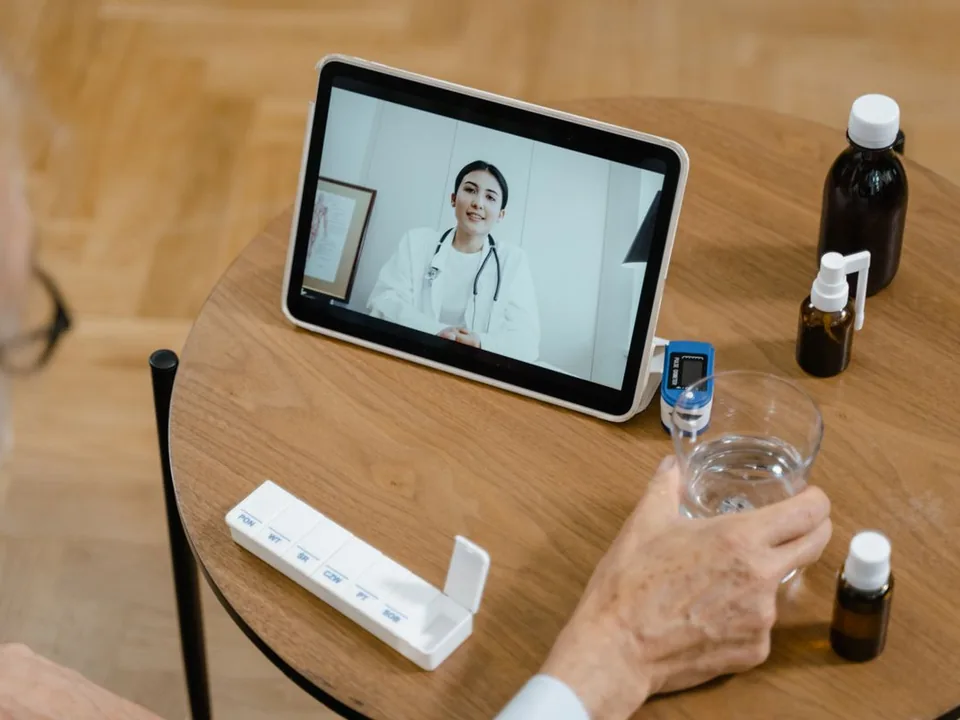
A tablet can make a telehealth visit easier than a phone, and that is one of the strongest reasons Medicaid members ask about one. The larger screen shows a doctor face more clearly, the front camera sits at a better angle on a table stand, and a family member can sit beside the patient and help with questions. Most telehealth visits need only a camera, a microphone, a speaker, and a steady internet connection. A basic tablet with a clear screen and a recent operating system can handle that, even if it cannot run the newest games or the fastest apps.
Before a Medicaid telehealth visit, test the tablet in the same room where the visit will happen. Open the video app the clinic uses, check that the camera shows the face and not the ceiling, and confirm the sound is loud enough to hear the doctor. If the managed care plan offers a nurse line, save that number on the tablet home screen as well.
Some Medicaid clinics offer a phone call as a backup when video fails, and some offer a patient portal where messages and test results can be read after the visit. Ask the clinic which backup it uses before the appointment, so a failed video call does not mean a missed visit.
State Differences That Change the Paperwork
Medicaid is a state program with federal rules, and that mix creates real differences from one state to another. The program name on the card may differ, the renewal date may differ, and the proof a carrier accepts may differ. Some states run Medicaid directly, others use several managed care plans, and a few use a mix of both. A reader in Texas and a reader in New York may both have Medicaid, but the letter they receive, the portal they use, and the phone number they call will not be the same.
What stays the same in every state is the Lifeline check. The National Verifier looks for Medicaid enrollment, not for a particular state form. If the state record is current, the check usually passes. If the state record is out of date because a renewal is still being processed, the check may fail until the state updates it. In that case, a recent approval letter or a portal screen that shows active coverage can help. Keep the letter that came with the last renewal, and keep the date it was issued. A letter from last year may not be accepted if the coverage year has changed.
State Medicaid offices also run their own renewal cycles, and a renewal that is missed can end coverage without a clear warning. A tablet application that fails in the middle of a renewal may have nothing to do with the carrier. Check the Medicaid status first, fix any renewal problem with the state office, and then return to the Lifeline application. A family that keeps its Medicaid active will have a much easier time with Lifeline, with a managed care perk, and with any clinic that asks for current coverage.

Choosing a Carrier and a Tablet That Fits Daily Use
Not every Lifeline carrier offers a tablet, and the ones that do change their models often. A carrier may offer a basic Android tablet one month and a different model the next, depending on what is in stock. Carrier stock rotates weekly in many cases, so a model a friend received may already be gone. Ask the carrier which tablet is available today, what size the screen is, how much storage it has, and whether it is new or refurbished. A refurbished tablet can work well, but the buyer should know it is refurbished before it arrives.
A tablet for telehealth, messages, and browsing does not need the most expensive model. It needs a screen that is easy to read, a battery that lasts through a day of light use, and enough storage for a few apps and photos. A screen of eight inches or more is easier for most adults than a small phone screen. Storage of 32 gigabytes is enough for basic use, and 64 gigabytes gives more room for apps and updates. Check that the tablet can connect to home Wi-Fi, because Wi-Fi use at home avoids using a cellular data allowance for every video call.
Compare at least two carriers before choosing one. One carrier may offer a larger tablet with a monthly line fee, while another offers a smaller tablet with no monthly fee beyond the Lifeline plan. The larger tablet is not a better deal if the monthly fee lasts for two years. Ask each carrier for the total cost in the first year, including any co-pay, any activation fee, and any monthly line charge. The carrier with the lower first year total is usually the better choice, even if its tablet looks plain in a photo.
Costs to Check Before You Sign Anything
The most common surprise in a tablet offer is a monthly charge that was not clear at the start. Retail stores in particular have offered a free tablet that adds a $20 to $25 per month cellular line to the account. That line charge continues every month, long after the excitement of a new tablet fades. The tablet may be free at the counter, but the line is not free, and the total over a year can reach $240 to $300. Always ask whether the tablet needs its own cellular line, or whether it can work on Wi-Fi only.
Activation is another word that hides a cost. Some carriers charge an activation fee when a tablet line is added, and some charge a fee to replace a lost SIM card. A SIM unlock question also matters for people who may want to change carriers later. Ask whether the tablet is locked to the carrier, how long the lock lasts, and what it costs to unlock it. A locked tablet that cannot be used with another carrier is worth less if the household moves or the carrier service is poor in that area. Get the unlock terms in writing before the tablet is shipped.
Co-pays are normal for some tablet offers, and a co-pay is not the same as a scam. A carrier may ask for a one time payment of $10 to $50 for a tablet, and a nonprofit may ask for a low cost device fee instead of giving a device away. The problem is not the co-pay itself, it is a co-pay that is hidden until the bill arrives. Ask for every charge in writing, keep the paper or the email, and do not sign a contract that lists a charge the sales person did not mention.
Staying Safe from Street Tents and Door to Door Offers
Pop up tents and door to door representatives have become a real problem in some cities, and Medicaid members are a common target. A representative may offer a free government tablet at a tent, at a grocery store, or at the front door, and the offer may sound simple. The risk is that the representative quietly transfers the household Lifeline benefit to a new carrier without clear consent. The household may not notice until the old service stops working or a new bill arrives. A transfer that the household did not agree to is a serious problem, and it can take weeks to fix.
Never hand a Medicaid card, a photo ID, or a Social Security number to a stranger at a tent or a door. A real Lifeline enrollment can be done through the official National Verifier, through a known carrier store, or through a carrier website that the household has checked. A person who pressures for an immediate signature, who refuses to leave a paper copy, or who says the offer ends in ten minutes is using pressure, not service. Walk away, keep any paper that was handed over, and report the encounter to the carrier and to the state consumer office if a transfer happened.
Reddit reports from 2025 and 2026 describe the same pattern in several cities: a tent offers a free tablet, the representative fills out a form on a phone, and the household later learns its Lifeline benefit moved to a different carrier. The tablet in those stories was often a basic model with a new monthly line attached. The lesson is simple and worth repeating. Apply through a channel the household can verify, keep a copy of every form, and check the Lifeline account after any enrollment to confirm which carrier holds the benefit. A few minutes of checking can save months of dispute.
Your Next Steps After Approval
Approval from the National Verifier is the first step, not the last one. After approval, the household still needs to choose a carrier, choose a plan, and confirm the tablet offer in writing. Start with the carrier comparison, because the tablet, the plan, and the monthly price all come from that choice. Call or visit two carriers, ask the same questions of each, and compare the first year cost. A carrier that answers clearly and gives a written summary is usually a safer choice than a carrier that rushes the sale.
When the tablet arrives, set it up on home Wi-Fi first and test the basics before adding a cellular line. Connect to Wi-Fi, sign in to the clinic portal or the video app, make a test call, and check that the sound and camera work. If the tablet was meant for Wi-Fi use only, do not activate a cellular line just because a screen prompts for it. Activation of a cellular line can start a monthly charge, and that charge may be hard to remove once it starts. If a cellular line is needed, confirm the monthly price again before tapping the activation button.
Keep every document from the application in one folder, either on paper or in a phone photo album. Keep the approval notice, the carrier agreement, the receipt for any co-pay, and the name of the person who helped. If a bill is wrong, if a transfer happens without consent, or if the tablet stops working in the first weeks, that folder is the proof that will be needed. A household that keeps its papers can fix a problem in one phone call, while a household without papers may spend weeks proving what happened.
Keep reading
Each of these pages covers one part of the same decision, and the free tablet with medicaid page pairs with the list below, so read the one that matches your situation next.
- free tablet with EBT
- free tablet with SSI
- free tablet for seniors
- free tablet application
- free tablet for students
Start at the free tablet homepage any time you want the full picture again, or go straight to the free tablet application page when you are ready to check eligibility.
Questions readers ask most
Does Medicaid give me a free tablet directly?
No, Medicaid does not give tablets directly. Medicaid enrollment qualifies you for Lifeline, the federal discount on phone or internet service. Some Lifeline carriers then offer a tablet with a co-pay or as a promotion. Check Lifeline first, then compare carrier tablet offers and monthly costs before you choose.
How do I prove Medicaid for Lifeline?
The National Verifier checks your Medicaid enrollment through official records. A Medicaid card, an approval letter, or a state portal screen with your name and a recent date can help if the automatic check fails. Make sure the name matches your application exactly, and keep a clear copy of the proof you submit.
How much is the Lifeline discount in 2026?
Lifeline gives up to $9.25 per month off phone or internet service for most households, and up to $34.25 per month on qualifying Tribal lands. The discount applies to service, not to a tablet. A tablet may still carry a co-pay or a monthly line charge, so ask for the full price in writing.
Can my managed care plan give me a tablet?
Some managed care plans offer a device, telehealth, or communications benefit, but it varies by state and plan. Call the member services number on your plan card and ask directly. Ask who ships the device, whether you pay anything, how long delivery takes, and whether you must return it if you change plans.
Can two people in my home each get Lifeline?
No, Lifeline allows only one benefit per household. A household is people who live together and share income and expenses. If someone in your home already uses Lifeline, a second application will be stopped. Check who already has the benefit before you apply. A second benefit at the same address is not allowed, even if both people receive benefits.
What should I check before I accept a tablet at a store?
Ask whether the tablet needs a cellular line and what that line costs each month. Some store offers add $20 to $25 per month for a tablet line. Ask about activation fees, the co-pay, the price after any promotion ends, and whether the tablet is locked to the carrier. Get the answers in writing.
Is a refurbished tablet a good choice for telehealth?
Yes, a refurbished tablet can work well for telehealth if it has a clear screen, a working camera and microphone, and a recent operating system. Test a video call in the room where visits happen, check the sound, and make sure it connects to your home Wi-Fi. Ask about any warranty before you accept it.
What do I do if a tent or door to door rep switched my Lifeline?
Contact your original carrier and the National Verifier right away, and ask which carrier now holds your benefit. Keep any paper the representative gave you. Do not give personal documents to strangers at tents or doors. Report an unauthorized transfer to the carrier and to your state consumer protection office.